Showing posts with label Windows Dev Center. Show all posts

Saturday, 30 November 2013

Creating a Dev Center Account

Creating a Dev Center Account 

In the previous post What to do with Dream spark Key ??? we had seen how to create a Dream spark account and use your Dream spark key to verify you as a student.

In this post we gonna see how to create dev center account (http://dev.windowsphone.com/)

  • First go to http://dev.windowsphone.com/  and click sign in 
  • Now you will see the Join the program page and in the bottom of page click on Accpet and Continue button


Creating Dev Center Account
  • Then in the next page choose your country and choose account type as individual
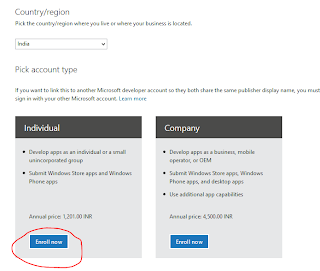
dreamspark account

  • You can see a payment page where you will be asked to pay Rs. 1200 but don't be panic since we can change the amount to zero by pasting a Registration code and then click Update Total button ( The Registration code is taken from the dreamspark.com website and the steps to get the code are explained below)

 Dreamspark.com
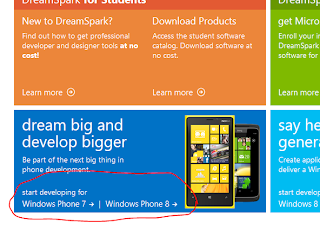
  •  Now in the next page there will be steps how to get developer tools and develop apps and In the step three (Bottom of the page) you can see Get your Registration Code.

Dreamspark.com

  •  Then in the upcoming page choose Get code now (If your account is not verified already choose verify now and login again in dream spark.com In my screen shot my account is already verified).
Dreamspark.com
  • Now copy the code (In my case SC35YND) and this is the registration code now paste the code in dev.windowsphone.com and update total button you can see the amount changed to zero.
  • Click on next button will take you to the Payment page 
  • In the payment page choose payment option .Don't worry we will be charged only Rs.2 as service charge for international transaction not more than that. (Prefer to use a visa card particularly ICICI bank card in my personal suggestion).
  • Choose OK at further steps thats solve your developer account is ready.
Hope you enjoyed the post 
If you have queries Feel free to mail as at digitalnativehelp@gmail.com

Saturday, 12 October 2013

What to do with Dream sprak key ???

What to do with Dream spark key??

In my previous post I posted about why we need dream spark key and how to get a free dream spark key.

Here is the next post in the series of creating Dev center account What to do with Dream Spark key ???


Then click on Students tab in dreamspark.com 

dreamspark.com

Now create individual account in the next page by clicking on Create account under individual category.


Then fill up the form in the next page I suggest you to use your live id for this registration step.

Now the last step is to verify you are a student.You will be given three choices to prove you are a student 
  •  Get verification through school
  • I have an ISIC card
  • I have a verification code
Now choose third option I have a verification code and now enter the Dream spark key you received from Microsoft. (Don't misuse the key since its valid for only one time, also don't share key with anyone)

Digital native Dreamspark.com
 
Thats all you will be verified as student by Microsoft Dream spark.

Next step is to create a dev center account

Learn how to create a dev center account at http://digitalnativedev.blogspot.in/2013/11/creating-dev-center-account.html

Friday, 11 October 2013

Chance to get free Windows Phone Developer account !!!

Chance to get free Windows Phone Dev account !!!

dev.windowsphone.com


To publish apps in windows phone store, you need to create an account in Windows Phone developer account .

Please visit the link  http://dev.windowsphone.com/

It will cost at least 50 $ to create a dev center account but for students its free Absolutely free !!!

To get free account all you need is a Dream spark Key

Dream spark key  is issued by Microsoft to students to get free access to windows phone and Windows Store developer center.

But its not easy to get a Dream spark key unless you participate in any Microsoft Hackethons or Your college registered with Microsoft.

Now you have a golden opportunity to get a Dream Spark key for free from DVLUP Contest, A contest for Windows Phone App Development.

To get a Dream spark key:

dreamspark


  • Create a new live id for free (also called as Microsoft ID) at live.com.
  • Now send a mail to QA.wp@live.com stating you are a student and you need a dream spark key for app development along with the scanned copy of your college ID from your new Live id.
  • Please be patience until they verify your ID and send you a dream spark ID.( It may take at least two days to get a key)
  • Now you can use that key for creating your dev center account (Remember the key is one time validity key so don't share it with others).


What to do with Dream spark key ???

How to create Dev center account ???

How to participate in DVLUP contest and win Lumia phones???

Confused ??? 

Read more in our coming post  !!!!